<!DOCTYPE html>
<html>
	<head>
		<title>My Title</title>
	</head>
	<body>
		<h1>Welcome to {{ shopName }}</h1>
		<ul>
		{% for product in products %}
		    <li><a href="{{ product.href }}">{{ product.name }}</a></li>
		{% endfor %}
		</ul>
	</body>
</html>Dieses Dokument beschreibt die Syntax und Semantik der twig-Vorlagen und dient als Referenz für das Erstellen oder Anpassen einer Vorlage.
Bitte beachten Sie, dass wir eine angepasste Twig-Template-Engine verwenden, die nur eine Teilmenge der Funktionen von Twig enthält.
Alle anwendbaren Funktionen werden in den nachfolgenden Abschnitten beschrieben.
Eine Vorlage ist einfach eine Textdatei, mit der sich jedes textbasierte Format (HTML, PDF usw.) erzeugen lässt.
Per Konvention haben alle unsere Vorlagendateien die Endung .twig.
Eine Vorlage enthält Variablen oder Ausdrücke, die bei der Auswertung der Vorlage durch Werte ersetzt werden, sowie Tags, die die Logik der Vorlage steuern. Nachfolgend finden Sie eine minimale Vorlage, die einige Grundlagen veranschaulicht. Weitere Details behandeln wir später:
Innerhalb einer twig-Vorlage werden zwei primäre Trennzeichen verwendet: {% … %} und {{ … }}.
Das erste wird verwendet, um Anweisungen auszuführen, die den Kontrollfluss der Vorlage ändern können (if-Anweisung), eine Vorlage mit include einzubinden, einen neuen Block zu definieren usw.
Das zweite gibt das Ergebnis eines Ausdrucks in der Vorlage aus. Ausdrücke können sehr einfach sein (z. B. ein Variablenname) oder deutlich komplexer (z. B. ein mathematischer Ausdruck).
Die Anwendung übergibt Variablen an die Vorlagen zur Bearbeitung in der Vorlage. Variablen können auch Attribute oder Elemente besitzen, auf die Sie zugreifen können. Die visuelle Darstellung einer Variablen hängt stark von der Anwendung ab, die sie bereitstellt.
Sie können einen Punkt . verwenden, um auf Attribute einer Variablen zuzugreifen.
{{ user.firstName }}|
Note
|
Es ist wichtig zu wissen, dass die geschweiften Klammern nicht Teil der Variablen sind, sondern der Druckanweisung. Wenn Sie innerhalb von Tags auf Variablen zugreifen, setzen Sie keine Klammern darum. |
Sie können Variablen innerhalb von Codeblöcken mit dem set-Tag Werte zuweisen:
{% set foo = 'foo' %}
{% set foo = [1, 2] %}
{% set foo = {'foo': 'bar'} %}Um einen Teil einer Zeile in einer Vorlage auszukommentieren, verwenden Sie die Kommentarsyntax {# … #}.
Das ist nützlich zum Debuggen oder um Informationen für andere Vorlagengestalter oder sich selbst hinzuzufügen:
{# Note: disabled template because we no longer use this.
    {% for item in items %}
        ...
    {% endfor %}
#}Eine Kontrollstruktur bezeichnet all jene Dinge, die den Ablauf eines Programms steuern, etwa Bedingungen (d. h. if/elseif/else), for-Schleifen sowie Konstrukte wie Blöcke.
Kontrollstrukturen erscheinen innerhalb von {% … %}-Blöcken. Um zum Beispiel eine Liste von Benutzern anzuzeigen, die in einer Variablen namens users bereitgestellt wird, verwenden Sie den for-Tag:
<h1>Members</h1>
<ul>
    {% for user in users %}
        <li>{{ user.username|e }}</li>
    {% endfor %}
</ul>
Mit dem if-Tag lässt sich ein Ausdruck prüfen:
{% if users | length > 0 %}
    <ul>
        {% for user in users %}
            <li>{{ user.username }}</li>
        {% endfor %}
    </ul>
{% endif %}Die mächtigste Funktion ist die Vorlagenvererbung. Die Vorlagenvererbung ermöglicht es Ihnen, eine Basisvorlage als "Skelett" zu erstellen, die alle gemeinsamen Elemente Ihrer Website enthält und Blöcke definiert, die untergeordnete Vorlagen überschreiben können. Kurze Erläuterungen, wie Sie eine Vorlage erben und nur einen Teil davon anpassen können, finden Sie bei den Tags extends und block.
XSS-Schwachstellen sind die häufigsten Arten von Sicherheitslücken in Webanwendungen, und um sie zu vermeiden, müssen Sie potenziell unsichere Daten mit Escaping versehen, bevor Sie sie dem Endbenutzer anzeigen.
In allen twig-Vorlagen ist das Autoescaping standardmässig aktiviert. Das Autoescaping kann deaktiviert werden; in diesem Fall können der autoescape-Tag und der escape-Filter für ein feineres manuelles Escaping verwendet werden.
Das Autoescaping, das standardmässig aktiviert ist, versieht das Ergebnis von Ausdrücken innerhalb der Druck-Trennzeichen ({{ und }}) automatisch mit Escaping:
{% set danger = "<br>" %}
{{ danger }}
{# output: <br> #}Mit dem raw-Filter kann verhindert werden, dass der Autoescaper einen bestimmten Ausdruck mit Escaping versieht. Es ist wichtig, dass der raw-Filter die letzte im Ausdruck durchgeführte Operation ist.
{% set danger = "<br>" %}
{{ danger | raw }}

{# output: <br> #}
Wenn der raw-Filter nicht die letzte im Ausdruck durchgeführte Operation ist, wird der Ausdruck vom Autoescaper als möglicherweise unsicher eingestuft und mit Escaping versehen:
{% set danger = "<br>" %}
{{ danger | raw | uppercase }}
{# will output: <BR> #}|
Note
|
Wenn der Ausdruck nur ein String-Literal enthält, wird er als sicher angenommen und nicht mit Escaping versehen. |
{% set hello = "<strong>Hello</strong>" %}
{{ hello }}
{{ "<strong>world</strong>" }} {# static expression #}
Das obige Beispiel wird als "<strong>Hello</strong> world" gerendert.
Wenn das Autoescaping deaktiviert ist, können Sie weiterhin den escape-Filter verwenden, um das manuelle Escaping zu unterstützen:
{% set danger = "<br>" %}
{{ danger | escape }}
{# output: <br> #}Beim Escaping von Daten ist es entscheidend, dass Sie je nach Kontext der Daten die richtige Escaping-Strategie verwenden. Standardmässig gehen der autoescape-Tag und der escape-Filter davon aus, dass Sie HTML-Daten mit Escaping versehen.
Die folgenden Escaping-Strategien werden unterstützt:
- css
-
Die
css-Strategie versieht einen String für den CSS-Kontext mit Escaping. CSS-Escaping kann auf jeden String angewendet werden, der in CSS eingefügt wird, und versieht alles ausser alphanumerischen Zeichen mit Escaping. - html
-
Die
html-Strategie versieht einen String für den HTML-Body-Kontext mit Escaping. - html_attr
-
Die
html_attr-Strategie versieht einen String für den HTML-Attribut-Kontext mit Escaping. - js
-
Die
js-Strategie versieht einen String für den JavaScript-Kontext mit Escaping. - url_param
-
Die
url_param-Strategie versieht einen String für die URL-Parameter-Kontexte mit Escaping. Dies sollte nicht verwendet werden, um eine gesamte URL mit Escaping zu versehen.
Functions can be called to generate content. Functions are called by their name followed by parentheses (()) and may have arguments.
The datetimeRange function is used to format date ranges with date and time information.
The formatting takes current user’s locale into consideration while formatting.
{# lowerDate = 2018-01-01 00:00:00 #}
{# lowerDate = 2018-02-01 23:59:59 #}
{{ datetimeRange(lowerDate, upperDate) }}
If user’s locale is English USA (en_US), the output would be:
Jan 01, 2018 - Feb 01, 2018If user’s locale is German (de_DE), the output would be:
01.01.2018 - 01.02.2018The json function returns the JSON representation of a value:
<select id="state-selection" data-options="{{ json(states) | escape('html_attr') }}">
	<option value=""></option>
	{% for state in country.states %}
		<option value="{{ state.id }}"
			{{ state.name }}
		</option>
	{% endfor %}
</select>The range function returns a list containing an arithmetic progression of numbers:
{% for i in range(0, 3) %}
    {{ i }},
{% endfor %}

{# output: 0, 1, 2, 3, #}- start
-
The
startis the frist argument ofrangefunction and represents starting number. - end
-
The
endis the second argument ofrangefunction and represents last number. - increment
-
The
incrementis the third argument ofrangefunction and represents the step. Theincrementis optional. If not provided the default increment step is 1.
Variables can be modified by filters. Filters are separated from the variable by a pipe symbol (|) and may have optional arguments in parentheses.
{{ variable | filter }}The following code is example of join filter which takes delimiter as an argument:
{{ list | join(', ') }}Multiple filters can be chained together. The output of one filter is applied to the next.
{{ variable | escape | title }}The abbreviate filter will abbreviate a string using an ellipsis (…). It takes one argument which is the maximal length of the desired output including the length of the ellipsis.
{{ "this is a long sentence." | abbreviate(7) }}The above example will output the following:
this...- length
-
The length to which input string should be abbreviated. The
lengthargument must not be less than zero.
The barCode filter generates a bar code image link with specified parameters.
{{ 'sometext' | barCode }}This will generate an image tag. The image will point to an URL which renders sometext as a bar code or QR code.
<img src="https://some-url">Different types of bar codes have different restrictions on length or what characters can be a part of the string:
-
QR_CODE: Maximum length 300 characters. -
CODE_128: Maximum length 80 characters, ASCII characters only. -
EAN_8: Maximum length 7 or 8 characters, digits only. When the code is 7 digits long, the check digit will be automatically calculated and added to the code. When the code is 8 digits long, the check digit must be correct. -
EAN_13: Maximum length 12 or 13 characters, digits only. When the code is 12 digits long, the check digit will be automatically calculated and added to the code. When the code is 13 digits long, the check digit must be correct.
- type
-
The
typeargument indicates the type of the bar code. If not specified, it defaults toCODE_128. Possible values:QR_CODE,EAN_8,EAN_13andCODE_128(default). - maxWidth
-
This argument indicates the maximum width of the bar code image. When not specified, it defaults to 200 pixels. The maximum value is 500 pixels. Other units will be converted with 72 DPI. Depending on the code and the available space, the resulting rendered code width may be smaller, but it will never be bigger.
- maxHeight
-
This argument indicates the maximum height of the bar code image. When not specified, it defaults to the same value as the width for QR-code or to 1/3 of the width for linear codes. The maximum value is 500 pixels. Other units will be converted with 72 DPI. Depending on the code and the available space, the resulting rendered code height may be smaller, but it will never be bigger.
- unit
-
The unit of measurement for width and height. When not specified, the default value is
PIXELS(screen or print pixels). Possible values are:MM(millimetres),IN(inches) andPIXELS(screen or print pixels). When specifying units other thanPIXELSthe calculation is done based on the 72 pixels per inch value.
The capitalize filter capitalizes the first letter of the input string. See also title filter.
{{ "article title" | capitalize }}The above example will output the following:
Article titleThe darken filter decreased the lightness of a color in the HSL color space by an absolute amount.
{{ '#ffffff' | darken(10) }}

{# output: rgba(230, 230, 230, 1) #}- amount
-
The
amountargument represents the percent amount that the color’s lightness should be decreased by. If theamountis not provided,1is used instead.
The date filter is used to format date. The formatting takes the current user’s locale into consideration while formatting.
{# user.dateOfBirth = 'October 21, 2015' #}

{{ user.dateOfBirth | date }}
If user’s locale is English USA (en_US), the output would be:
10/21/15If user’s locale is German (de_DE), the output would be:
21.10.15- defaultValue
-
The
datefilter can accept adefaultValueargument which is returned if input date isnull. - format
-
The
formatargument allows specifying how the date is formatted. Possible values:SHORT(default),LONG.
The datetime filter is used to format date with date and time information.
The formatting takes the current user’s locale into consideration while formatting.
{{ transaction.createdOn | datetime }}If user’s locale is English USA (en_US), the output would be:
Oct 20, 2015, 11:00:00 PMIf user’s locale is German (de_DE), the output would be:
20.10.2015, 23:00:00- defaultValue
-
The
datetimefilter can accept adefaultValueargument which is returned if input date isnull.
The default filter will render a default value if and only if the value being filtered is empty. A variable is empty if it is null, an empty string, an empty collection, or an empty map.
{{ billingAddress.phoneNumber | default("No phone number") }}

{{ '' | default('passed variable is empty')  }}
In the following example, if foo, bar, or baz are null the output will become an empty string which is a perfect use case for the default filter:
{{ foo.bar.baz | default("No baz") }}- default
-
The
defaultfilter has argument calleddefaultwhich is returned in case when input value is empty.
The escape filter escapes a string, to avoid XSS vulnerability, for safe insertion into the final output.
It supports different escaping strategies depending on the template context.
|
Note
|
By default, the |
{% autoescape false %}
{{ "<div>" | escape }}
{% endautoescape %}
{# output: <div> #}The above example is equivalent to:
{% autoescape false %}
{{ "<div>" | escape('html') }}
{% endautoescape %}
{# output: <div> #}Please read the escaping section for more information about escaping.
- strategy
-
For the full list of escaping strategies refer to strategies section.
The first filter will return the first item of a collection, or the first letter of a string.
{{ ["Alex", "Joe", "Bob"] | first }}
{# will output: 'Alex' #}

{{ 'John' | first }}
{# will output: 'J' #}The formatAddress filter is used to format a modular address.
<div class="customerAddress">
	{% for line in transaction.billingAddress | formatAddress(false) %}
		{{ line }}<br />
	{% endfor %}
</div>The formatAddress filter has one optional argument excludeCountryLine which allows to skip the
country line of the address. The argument excludeCountryLine must be a boolean. The default behavior
is to include the country line.
The formatAmount filter formats a given number based on the passed currency and current user locale. The arguments described below can be used to
override the locale settings.
{{ transaction.authorizationAmount | formatAmount(transaction.currency) }}- currency
-
The currency is used to format the given amount.
- allowedDigits
-
The maximum allowed number of decimal digits. When not specified, the value will be taken from the number of decimal digits that exist in the specified currency. E.g., for the currency
CHFthis value would be 2, and forJPYit would be 0. - symbolPosition
-
Determines where the currency symbol should be placed. The possible values are:
-
BEFOREThe currency symbol should be placed before the amount:CHF 100. -
AFTERThe currency symbol should be placed after the amount:100 CHF. -
FROM_LOCALEThe default value, it indicates that the applied style will be determined from the current user’s locale / language.
-
- negativeStyle
-
Determines the style of how the negative numbers are displayed. The possible values are:
-
MINUSUse the minus sign to show negative numbers such as-100 CHF. -
BRACKETSUse brackets to display negative values such as(100 CHF). -
FROM_LOCALEThe default value, it indicates that the applied style will be determined from the current user’s locale / language.
-
- spacing
-
Determines whether there should be a space between the currency symbol or amount. The possible values are:
-
ALWAYSThere should be always a space between the currency and the amount:CHF 100or100 CHF. -
NEVERThere should not be a space between the currency and the amount:CHF100or100CHF. -
FROM_LOCALEThe default value, it indicates that the applied style will be determined from the current user’s locale / language.
-
- symbol
-
Determines whether the currency should be displayed with its 3-letter ISO code or with a localized symbol. The possible values are:
-
ISO_CODEDisplay the currency with the 3-letter ISO code:100 CHF. This is the default value. -
SYMBOLDisplay the currency with a localized symbol, e.g. in German locale:100 SFr..
-
The join filter will concatenate all items of a collection or array into a string. An optional argument can be given to be used as the separator between items.
{{ ["Alex", "Joe", "Bob"] | join(', ') }}
{# will output: Alex, Joe, Bob #}

{{ ["Alex", "Joe", "Bob"] | join }}
{# will output: AlexJoeBob #}- separator
-
The
separatoris string used to separate the collection elements. Theseparatoris optional.
The last filter will return the last item of a collection, or the last letter of a string.
{{ [1, 2, 3, 4, 5] | last }}
{# will output: 5 #}

{{ 'Apple' | last }}
{# will output: 'e' #}The length filter returns the number of items of collection, map or the length of a string:
{{ ["Apple", "Orange", "Mango"] | length }}

{# will output: 3 #}
The length filter can be used inside if tag to make as a conditional
{% if users|length > 10 %}
    ...
{% endif %}The lighten filter increased the lightness of a color in the HSL color space by an absolute amount.
{{ '#000000' | lighten(10) }}

{# output: rgba(26, 26, 26, 1) #}- amount
-
The
amountargument represents the percent amount that the color’s lightness should be increased by. If theamountis not provided,1is used instead.
The lineItemTotalAmountExcludingTax filter calculates the total amount without taxes from a list of line items.
{{ lineItems | lineItemTotalAmountExcludingTax }}The above example will output the following:
101.12The lineItemTotalAmountIncludingTax filter calculates the total amount with taxes from a list of line items.
{{ lineItems | lineItemTotalAmountIncludingTax }}The above example will output the following:
101.12The lineItemTotalDiscountExcludingTax filter calculates the total discount excluding taxes from a list of line items.
{{ lineItems | lineItemTotalDiscountExcludingTax }}The above example will output the following:
10.12The lineItemTotalDiscountIncludingTax filter calculates the total discount including taxes from a list of line items.
{{ lineItems | lineItemTotalDiscountIncludingTax }}The above example will output the following:
10.12The lineItemTotalTaxAmountsByRate filter calculates the total tax amounts per tax rate from a list of line items.
{{ lineItems | lineItemTotalTaxAmountsByRate(currency) }}The above example will output the following:
[Tax [title=Rate 1, rate=10, amount=55.76], Tax [title=Rate 2, rate=3.5, amount=0.55]]The lineItemTotalUndiscountedAmountExcludingTax filter calculates the total undiscounted amount without taxes from a list of line items.
{{ lineItems | lineItemTotalUndiscountedAmountExcludingTax }}The above example will output the following:
101.12The lineItemTotalUndiscountedAmountIncludingTax filter calculates the total undiscounted amount including taxes from a list of line items.
{{ lineItems | lineItemTotalUndiscountedAmountIncludingTax }}The above example will output the following:
101.12The lower filter converts all letters of an input string into lower case.
{{ "THIS IS A LOUD SENTENCE" | lower }}The above example will output the following:
this is a loud sentenceThe numberformat filter is used to format a decimal number.
{{ 3.141592653 | numberformat("#.##") }}

{# output: 3.14 #}
You can round the decimal number to whole number by not defining fractional numbers:
|
Note
|
The rounding of decimal number is applied by default, if number of fractional digits of the input number is bigger than number of fractional digits allowed by format pattern. |
{{ 3.5 | numberformat("#") }}
{# output: 4 #}

{{ 3.3 | numberformat("#") }}
{# output: 3 #}
To define different formats for positive and negative numbers use ; to separate positive and negative sub-patterns.
{% set format = '###,###.##;-###,###.##' %}

{% set number = 1234 %}
{{ number | numberformat(format) }}
{# output: 1,234 #}

{% set number = -1234 %}
{{ number | numberformat(format) }}
{# output: -1,234 #}
You can use any digit from 0 to 9 in format pattern which will be output literally if the number is .
To format number always with two fractional digits even if the number is not decimal, you can define following format:
{{ 7 | numberformat("#.00") }}
{# output: 7.00 #}

{{ 7 | numberformat("#.99") }}
{# output: 7.99 #}

{{ 123.4 | numberformat("#.00") }}
{# output: 123.40 #}

{{ 123.45 | numberformat("#.00") }}
{# output: 123.45 #}
Another use of digits can be if you want to prefix number smaller than format:
{{ 7 | numberformat('000.##') }}
{# output: 007 #}- format
-
The
formatargument represents a pattern, used to format input number. Many characters in a pattern are taken literally, they are output unchanged during formatting. Special characters, on the other hand, stand for other characters, strings, or classes of characters. They must be quoted if they are to appear in the prefix or suffix as literals. The characters listed here are used in formating
| Character | Location | Meaning |
|---|---|---|
0-9 |
Number |
Digit |
# |
Number |
Digit, zero shows as absent |
. |
Number |
Decimal separator or monetary decimal separator |
- |
Number |
Minus sign |
, |
Number |
Minus sign |
E |
Number |
Separates mantissa and exponent in scientific notation. Need not be quoted in prefix or suffix. |
; |
Subpattern boundary |
Separates positive and negative sub-patterns. It is important to note that the first pattern (before ; character) is used for formatting positive number and second, for negative. |
% |
Prefix or suffix |
Multiply number by 100 and show as percentage |
‰ |
Prefix or suffix |
Multiply number by 1000 and show as per mille value |
' |
Prefix or suffix |
Used to quote special characters in a prefix or suffix, for example, '#'# formats 123 to #123. To create a single quote itself, use two in a row: # o''clock. |
The qrCode filter generates a bar code image link with specified parameters.
{{ 'sometext' | qrCode }}This will generate an image tag. The image will point to an URL which renders sometext as a QR code.
<img src="https://some-url">The raw filter prevents the output of an expression from being escaped by the autoescaper.
The raw filter must be the very last operation performed within the expression otherwise the autoescaper will deem the expression as potentially unsafe and escape it regardless.
{% set danger = "<div>" %}

{{ danger | upper | raw }}

{# output: <DIV> #}
If the raw filter is not the last operation performed then the expression will be escaped:
{% set danger = "<div>" %}
{{ danger | raw | upper }}
{# output: <DIV> #}The replace filter formats a given string by replacing the placeholders (placeholders are free-form):
{% set this = 'trains' %}

{{ "I like %this% and %that%." | replace({'%this%': this, '%that%': "planes"}) }}

{# output: I like trains and planes. #}- replace_pairs
-
The
replace_pairsargument accept pairs ofplaceholderandreplacementdelimited by colon (:). Pairs are separated by comma (,).
The rsort filter will sort an input list in reversed order.
{% set fruits = [ "Orange", "Avocado", "Kiwi", "Banana"] %}

{{ fruits | rsort }}

{# output: [Orange, Kiwi, Banana, Avocado] #}The slice filter returns a portion of a list, array or string.
{{ ['Apple', 'Peach', 'Pear', 'Banana'] | slice(1,3) }}
{# output: [Peach, Pear] #}

{{ 'Apple' | slice(1,3) }}
{# output: pp #}- fromIndex
-
The
fromIndexargument is zero-based and inclusive. - toIndex
-
The
toIndexargument is zero-based and exclusive.
|
Note
|
Zero-based means that numbering of elements in a list starts at 0. The initial element of the list is assigned the index 0, rather than the index 1. |
The sort filter will sort an input list in reversed order.
{% set fruits = [ "Orange", "Avocado", "Kiwi", "Banana"] %}

{{ fruits | sort }}

{# output: [Avocado, Banana, Kiwi, Orange] #}The split filter splits an input string by the given separator and returns a list of strings:
{% set input = "one,two,three" %}

{% set output = input | split(',')  %}

{# output contains ['one', 'two', 'three'] #}
If a separator is an empty string, then the input value will be split into a list of characters.
{% set input = "Lemonade" %}

{% set output = input | split('')  %}

{# output contains ['L', 'e', 'm', 'o', 'n', 'a', 'd', 'e'] #}- separator
-
The
separatorargument represents the delimiting regular expression. If theseparatoris not provided the,is used instead.
The temporalAmount filter is used to format an amount of time, such as "6 hours", "2 days" or "3 years and 2 months".
<p>This link will expire in {{ chargeFlowLevel.configuration.period | temporalAmount }}.</p>Example with defaultValue:
<p>This link will expire in {{ chargeFlowLevel.configuration.period | temporalAmount("1 day") }}.</p>- defaultValue
-
The
temporalAmountfilter can accept adefaultValueargument which is returned if input date isnull. - textWidth
-
The
temporalAmountfilter can accept atextFormatargument that controls the formatting of the output. The possible values are:WIDE(default, units are shown with full names),SHORT(units are shown with short abbreviations),NARROW(units are shown with one-letter abbreviations).
The time filter is used to format date with only time information.
The formatting takes current user’s locale into consideration while formatting.
{{ transaction.createdOn | time }}If user’s locale is English USA (en_US), the output would be:
11:00:00 PMIf user’s locale is German (de_DE), the output would be:
23:00:00- defaultValue
-
The
timefilter can accept adefaultValueargument which is returned if input date isnull.
The translate filter is used to support internationalization by translating input string into user’s language. In case you want to use the translations provided by the platform you should not touch the translation strings. However, you have the option to provide your own output but you will have to maintain it for every language yourself in that case.
{{ 'Access Denied' | translate }}If user’s language is English, the output would be:
Access DeniedIf user’s language is German, the output would be:
Zugriff verweigertThe translate filter can accept a map of arguments which should be replaced by its placeholders in message. Message placeholder is written inside curly brackets ({…}).
 {% set arguments = {'userName' : 'John'} %}

 {{ 'Hello {userName}' | translate(arguments) }}

 {# output: 'Hello John' #}
All messages in twig templates are fully translated for supported languages. Changing the message in twig template
If you do not change messages or use the same messages which are filtered with translate filter, you will benefit from having everything automatically localized.
|
Note
|
All messages are fully translated in languages we currently support. |
In case you want to customize translated messages and provide your own translations,
you can achieve this by editing desired twig template using resource editor under Space > Resources > Editor.
Editing of resource is bound to a context which consists of language and Space or Space View.
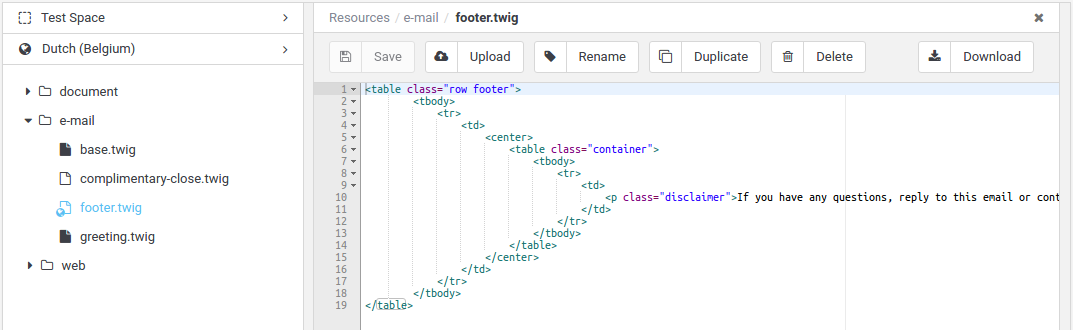
Figure 1. Resource Editor
At the upper-left corner of the resource editor you can select desired Space, Space View and Language, and click to open a resource in context. Opening will automatically create new resource for the current context. When you are finished with customization, click save button to persist all changes.
Sometimes there is a need to translate different messages based on a number.
Typically, translations for singular and plural differ and that’s where the translatePlural filter can help.
The translatePlural can be used to translate singular and plural messages.
The input string of translatePlural filter is a singular message.
The plural message is passed as a pluralText argument.
{% set pluralArguments = {'numberOfApples' : appleTree.numberOfApples} %}
{{ 'There is one apple on the tree.' | translatePlural('There are {numberOfApples} apples on the tree.', appleTree.numberOfApples, pluralArguments) }}
Assuming that apple tree has 99 apples, the above example would output:
There are 99 apples on the tree.- pluralText
-
The plural text, which is translated and returned as a result when
numberOfPluralsis greater than 1. - numberOfPlurals
-
The number based on which the singular or plural text is selected for translation.
- arguments:: arguments
-
The map of arguments which should be replaced in a translated string.
The trim filter strips whitespace from the beginning and end of an input string:
{{ " This text has too much whitespace. " | trim }}The above example will output the following:
This text has too much whitespace.The urlencode filter translates an input string into application/x-www-form-urlencoded format using the UTF-8 encoding scheme.
|
Note
|
The URL encoding converts characters into a format that can be transmitted over the Internet. |
{{ "This string is UTF-8 encoded using application/x-www-form-urlencoded scheme." | urlencode }}The above example will output the following:
This+string+is+UTF-8+encoded+using+application%2Fx-www-form-urlencoded+scheme.The autoescape tag can be used to temporarily disable or re-enable the autoescaper, as well as change the escaping strategy for a portion of the template.
Whether automatic escaping is enabled or not, you can mark a section of a template to be escaped or not by using the autoescape tag:
{{ danger }} {# will be escaped by default #}
{% autoescape false %}
    {{ danger }} {# will not be escaped #}
{% endautoescape %}
{{ danger }} {# will use the "html" escaping strategy #}
{% autoescape "js" %}
{{ danger }} {# will use the "js" escaping strategy #}
{% endautoescape %}When automatic escaping is enabled everything is escaped by default except for values explicitly marked as safe. Those can be marked in the template by using the raw filter:
{% autoescape %}
    {{ safe_value|raw }}
{% endautoescape %}
See the escaping section for more details on how escaping works.
The block tag provides a way to change how a certain part of a template is rendered but it does not interfere in any way with the logic around it.
The blocks are mainly used for inheritance and act as placeholders and replacements at the same time.
The block tag is immediately followed by the name of the block.
This name will be the same name a child template uses to override it.
The endblock tag can optionally contain the block’s name for readability.
A simple definition of a block with the name title would look like this:
{% block title %}
     ...
{% endblock title %}|
Note
|
Block names should consist of alphanumeric characters, and underscores. Dashes are not permitted. |
Let’s take the following example to illustrate how a block works and more importantly, how it does not work:
base.twig
{% for post in posts %}
    {% block post %}
        <h1>{{ post.title }}</h1>
        <p>{{ post.body }}</p>
    {% endblock %}
{% endfor %}
If you render this template, the result would be exactly the same with or without the block tag.
The block inside the for loop is just a way to make it overridable by a child template:
child.twig
{% extends './base.twig' %}

{% block post %}
    <article>
        <header>{{ post.title }}</header>
        <section>{{ post.text }}</section>
    </article>
{% endblock %}
Now, when rendering the child template, the loop is going to use the block defined in the child template instead of the one defined in the base one.
|
Note
|
A child template should not have any content outside of blocks. A child template is only used to override blocks of a parent template. |
The executed template is then equivalent to the following one:
{% for post in posts %}
    <article>
        <header>{{ post.title }}</header>
        <section>{{ post.text }}</section>
    </article>
{% endfor %}
Let’s take another example: a block included within an if statement:
{% if posts is empty %}
    {% block head %}
        {{ parent() }}

        <meta name="robots" content="noindex, follow">
    {% endblock head %}
{% endif %}
Contrary to what you might think, this template does not define a block conditionally,
it just makes overridable, by a child template, the output of what will be rendered when the condition is true.
If you want the output to be displayed conditionally, use the following instead:
{% block head %}
    {{ parent() }}

    {% if posts is empty %}
        <meta name="robots" content="noindex, follow">
    {% endif %}
{% endblock head %}The extends tag allows to extend a twig template from another one in order to modify it by changing or adding features.
By extending a parent template, a child template inherits all content of the parent template.
This allows a child template to customize the parts of the parent template.
To better understande the concept, let’s define a parent template which we will call base.twig:
base.twig
<html>
    <head>
    	<title>{% block title %} {% endblock %}</title>
    </head>
    <body>
    	<div id="content">
    	     {% block content %}
    	     Default content goes here.
    	     {% endblock %}
    	</div>

    	<div id="footer">
    	     {% block footer %}
    	     Default footer content
    	     {% endblock %}
    	</div>
    </body>
</html>
In this example, the block tags define three blocks (title, content and footer) that child templates can override or fill in.
All the block tag does is to tell the template engine that a child template may override those parts of the template.
A child template might look like this:
child.twig
{% extends './base.twig' %}

{% block title %} Home {% endblock %}

{% block content %}
    Home page content.
{% endblock %}
The extends tag is the key here, and it tells the template engine that this template inherits everything from parent template.
When the template system evaluates this template, it first locates the parent.
The extends tag must be the first tag in the template.
There is no limit to how long of an inheritance chain you can create, i.e. a child template can itself have a child template. A lot of potential comes from this fact because you can create a hierarchy of templates to minimize how much content you have to write on the lower levels.
Note that since the child template doesn’t define the footer block, the value from the parent template is used instead.
You can’t define multiple block tags with the same name in the same template. This limitation exists because a block tag works in "both" directions. That is, a block tag doesn’t just provide a hole to fill - it also defines the content that fills the hole in the parent. If there were two block tags with the same name in a template, that template’s parent wouldn’t know which one of the blocks' content to use.
<html>
    <head>
    	<title> Home </title>
    </head>
    <body>
    	<div id="content">
    	     Home page content.
    	</div>

    	<div id="footer">
    	     Default footer content
    	</div>
    </body>
</html>The filter tag allow you to apply regular filters on a block of template data.
Just wrap the code in the special filter section:
{% filter upper %}
    This text becomes uppercase
{% endfilter %}
You can also chain filters:
{% filter lower|escape %}
<strong>SOME TEXT</strong>
{% endfilter %}
{# output: "<strong>some text</strong>" #}The for tag is used to iterate through arrays, lists, collections as well as maps.
{% for user in users %}
    {{ user.name }} lives in {{ user.city }}.
{% endfor %}
Inside of a for loop block you can access some special variables:
- loop.index
-
The zero-based current iteration of the loop.
- loop.length
-
The size of the collection we are iterating over.
{% for user in users %}
    {{ loop.index }}. {{ user.name }}
{% endfor %}
The for tag also provides a convenient way to check if the iterable object is empty with the included else tag.
{% for user in users %}
   {{ user.name }} lives in {{ user.city }}.
{% else %}
    There are no users to display.
{% endfor %}
Iterating over maps can be done like so:
{% for entry in map %}
    {{ entry.key }} - {{ entry.value }}
{% endfor %}The if tag can be used to change the flow of template rendering, depending on the result of an expression.
{% if users is empty %}
    There are no users.
{% elseif users.length == 1 %}
    There is only one user.
{% else %}
    There are many users.
{% endif %}
{% if temperature > 18 and temperature < 27 %}
<p>It's a nice day for a walk in the park.</p>
{% endif %}{% if not user.subscribed %}
<p>You are not subscribed to our mailing list.</p>
{% endif %}The include tag allows you to insert the rendered output of another template directly into the current template.
{% include 'header.twig' %}
    Body content goes here.
{% include 'footer.twig' %}
The included template will have access to the same variables that the current template does.
You can add additional variables, to the included template, by passing them after the with keyword:
{% include 'template.twig' with {'foo': 'bar', 'baz' : true} %}Tests are used in combination with test operators to produce a logical result.
The defined checks if a variable is defined in the current context.
The defined test works with variable names and attributes on variable names.
{% if user is defined %}
	{% if user.dateOfBirth is defined %}
    	    ...
	{% endif %}
{% endif %}The empty test checks if a variable is empty. A variable is empty if it is null, an empty string, an empty collection, or an empty map.
{% if user.email is not empty %}
    ...
{% endif %}
{% set name = '' %}
{{ name is empty }}
{# output: true #}The existing test checks if a resource path exists.
{# evaluates to true if the resource path exists #}
{{ resourcePath is existing }}The iterable test checks if a variable is capable of being iterated.
|
Note
|
Collections, lists and maps are all iterable. |
{# evaluates to true if the users variable is iterable #}
{% if users is iterable %}
    {% for user in users %}
        Hello {{ user }}!
    {% endfor %}
{% else %}
    {# users is probably a string #}
    Hello {{ users }}!
{% endif %}The map test checks if a variable is an instance of a map data type.
|
Note
|
In computer science map is an abstract data type composed of a collection of (key, value) pairs, such that each possible key appears at most once in the collection. |
{{ {"apple":"red", "banana":"yellow"} is map }}

{# output: true #}The null test checks if a variable is null.
|
Note
|
|
{% set name = null %}

{{ name is null }}

{# output: true #}An arithmetic operator takes numerical values as their operands and returns a single numerical value.
All the regular math operators (+, -, /, %, *) are available for use within expression blocks.
Order of operations applies to all operators.
{{ 2 + 2 / ( 10 % 3 ) * (8 - 1) }}

{# output: 16 #}Logical operators are typically used with logical values (true and false) or with expressions which return logical value.
The and and or operators are available to join boolean expressions.
The and operator evaluates to true if the left and the right expression are both true.
{% if 2 is even and 3 is odd %}
    ...
{% endif %}The or operator evaluates to true if the left or the right expression is true.
{% if 2 is even or 2 is odd %}
    ...
{% endif %}A comparison operator compares its operands and returns a logical value based on whether the comparison is true. The operands can be numerical, string, logical, or object values.
The following comparison operators are available in any expression: ==, !=, <, >, <=, >=.
{{ 1 > 3 }}

{# output: false #}|
Note
|
The |
{{ 'Monkey' equals 'Dog' }}

{# output: false #}The contains operator can be used to determine if a collection, map, or array contains a particular item.
{{ ["apple", "pear", "banana"] contains "apple" }}

{# output: true #}
When using maps, the contains operator checks for an existing key.
{% set fruits = {"apple":"red", "banana":"yellow"} %}

{{ fruits contains "banana" }}

{# output: true #}
The contains operator can be used to look for multiple items at once:
{% set fruits = ["apple", "pear", "banana", "peach"] %}

{{ fruits contains ["apple", "peach"] }}

{# output: true #}The ~ operator is used to concatenate two strings.
{% set greeting = 'Hello ' %}
{% set name = 'John' %}

{{ greeting ~ name }}

{# output: 'Hello John' #}The ?: is called ternary operator and takes three arguments.
The syntax is condition ? expr1 : expr2, where condition is an expression which evaluates to true or false, and expr1 and expr2 are expressions of any type.
{% set number = -1 %}

{{ 'Number is ' ~ (number > 0 ? 'positiv' : 'negative') ~ '.' }}

{{ outputs: 'Number is negative.' #}